The I'm sorry I lied trend is this year's Halloween costume reveal. Last year's costume was whatever someone could finish the night before: a yellow wig, a pink snowsuit, a crown cut from cardboard. This year the first picture looks like a film still, and the joke is watching that still come apart. One slide admits the wig. The next admits the costume. The last one is the real photo, cheap and obvious, with "i'm so sorry" across it.
That carousel is the Halloween version of the trend. It is a photo post, not a dance, and it spread on TikTok through October 2026. People pull an old costume photo out of a camera roll, or use any photo of themselves, and an edit builds the movie version of the same person. They post the sequence as a TikTok photo carousel and add the trend's sound.
Updated Oct 27, 2026
The short answer
The "I'm sorry I lied" Halloween costume trend is a TikTok photo carousel from October 2026. Slide 1 is an AI-perfect version of an old Halloween costume photo, each next slide admits one thing ("ok i lied, my wig wasn't that good"), and the last slide is the real, cheaper costume with "i'm so sorry". You need one photo; an AI Halloween costume tool makes the perfect slides and the reveal.
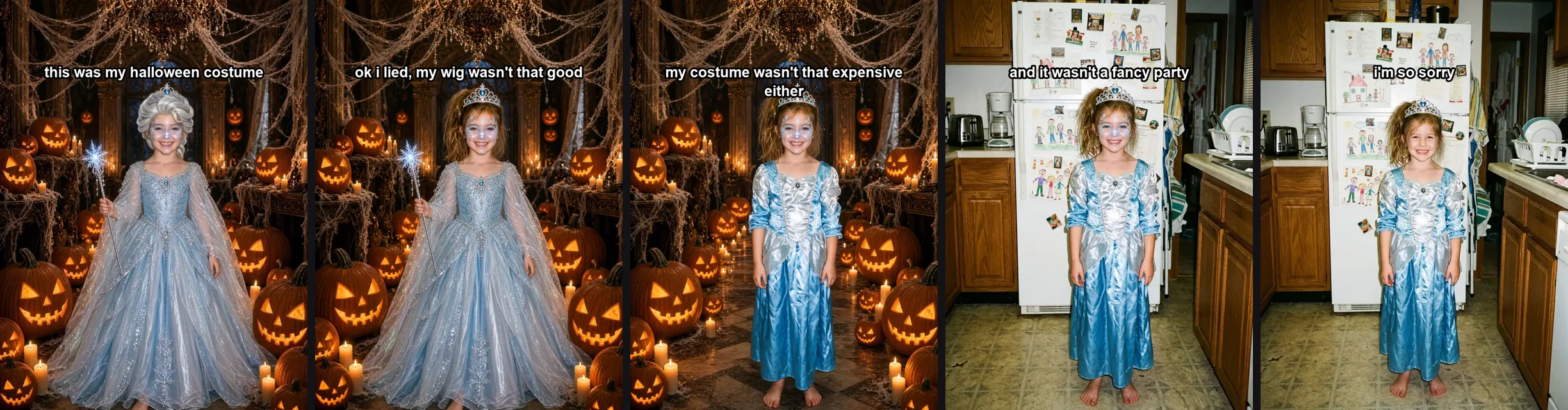
Five slides from a set we made with our AI Halloween costume generator in October 2026, from one photo of a person who does not exist.
Key facts
| Fact | Detail |
|---|---|
| Format | TikTok photo carousel, 4–5 slides, 3:4 |
| Started | Oct 19, 2026, English Halloween version |
| Biggest post | 1.3M likes, 466K shares |
| Tag | #imsorryilied, 8.8M views |
| Sound | original sound - secret |
| Captions | "ok i lied…", ends with "i'm so sorry" |
How the slides work
A set is one photo told backwards. Slide 1 is the full AI costume: wig, outfit, party and makeup all at once, movie-quality, the person still recognizable. Every slide after that takes one thing back. On this style the order is Perfect wig → Expensive costume → Fancy party → Pro makeup. The last slide is not another edit. It is the real photo, and it owns up to the last lie by showing it, with the closer and no other line.
The words sit on the pictures, printed on after the edit so the face stays clean. Slide 1 sets the scene, the middle slides own up, and the real photo only says "i'm so sorry". You can change any line before you save.
The exact captions
These lines are the Halloween style's own, in the order a full set can say them. The opener is slide 1. For each thing the AI lied about, the first sentence is the one that owns up, and the second is how a later slide continues it. The closer is the real photo.
- this was my halloween costume
- ok i lied, my wig wasn't that good
- my wig wasn't that good either
- ok i lied, my costume wasn't that expensive
- my costume wasn't that expensive either
- ok i lied, it wasn't a fancy party
- and it wasn't a fancy party
- ok i lied, my makeup wasn't that good
- and my makeup wasn't that good
- i'm so sorry
How to make yours with AI
You need one photo. The AI Halloween costume generator on AI Rapping turns it into the whole carousel: the movie costume, the slides that take it back, and the captions already on them.
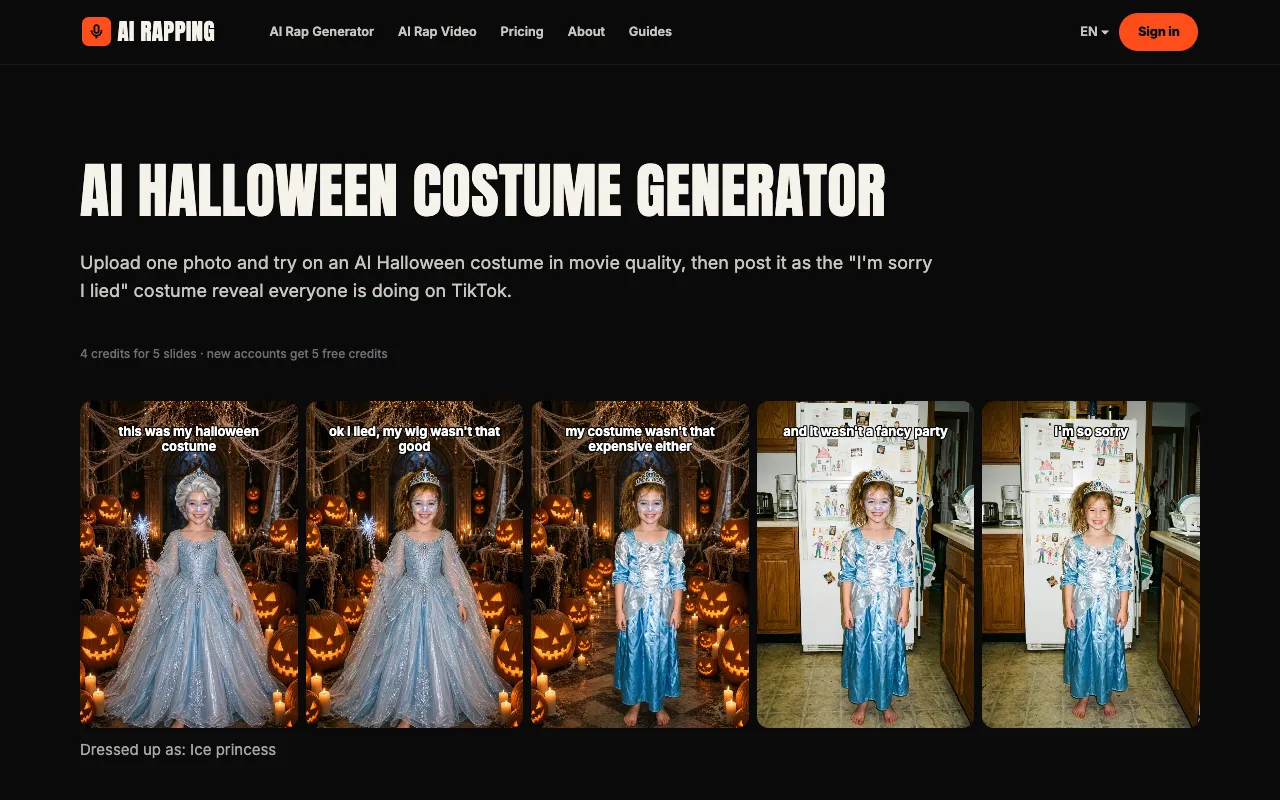
The AI Halloween costume generator on AI Rapping: one photo in, the whole set out.
- Upload one photo. One person, face clear, upper body in the frame. An old Halloween photo is the funniest, because the real slide is already a costume. Any photo works if you would rather pick a costume from scratch.
- Pick a costume. Keep the costume you are already wearing and upgrade it, or choose one from the list below.
- Pick what the AI lies about. Wig, costume, party and makeup. Each one you keep becomes a slide that owns up to it.
- Save and post. Download the slides, post them as a TikTok photo carousel, and add the sound inside TikTok. Most posts use original sound - secret, the sound created on October 7, 2026.
Costume ideas that work
The funny ones are the homemade costumes people actually wore. The generator dresses the photo up as one of these, then the real photo gives it back:
- Ice princess — the snowsuit reveal: a movie ice princess that was really a yellow wig and a pink snowsuit.
- Clown — circus makeup that looks painted for a film, then a red nose and a borrowed wig.
- Witch — a perfect hat and cloak, then the real photo is a plastic hat and a black sheet.
- Vampire — a film vampire, then a cape from a bag and two plastic teeth.
- Superhero — a caped hero, then a towel and a mask drawn on with a pen.
- Fairy — wings and a gown, then cardboard wings and a tutu.
- Cat — a black cat that looks like a film costume, then ears on a headband.
Tips for a funnier reveal
- The real photo should look cheaper than the first slide. A snowsuit, a plastic hat, ears on a headband: the gap is the joke.
- Keep slide 1 as perfect as the tool will make it. The more it looks like a film, the harder the second slide lands.
- Edit the captions so they name what you actually wore. A line about a cardboard crown beats a line that could be anyone's.
- Add the sound when you post. The carousel is silent until TikTok plays it, and the last week of October is when people are still looking for a costume.
I'm sorry I lied trend FAQ
Where did the I'm sorry I lied trend come from?
It grew out of the Spanish "perdón" childhood-photo trend in mid October 2026. The English Halloween version took off on October 19, when a "princess" costume that was really a yellow wig and a pink snowsuit passed 1.3 million likes on TikTok.
What sound is used for the I'm sorry I lied trend?
Most posts use the TikTok sound "original sound - secret", created on October 7, 2026. Add it inside TikTok when you post the carousel.
How many slides does it have?
Usually 4 or 5: the perfect AI version, two or three slides that each take one thing back, and the real photo last.
What do the captions say?
Slide 1 sets it up ("this was my halloween costume"), the middle slides start with "ok i lied" or "ok sorry", and the last slide says "i'm so sorry".
Do I need an AI app to do it?
For the perfect first slides, yes: they are edits of your real photo. AI Rapping's AI Halloween costume generator makes every slide from one photo and prints the captions on them.
Can I do it without an old costume photo?
Yes. Use any photo of yourself and pick a costume; the AI dresses you up and the real photo is the reveal.
One photo is the whole costume. When you have it, try on an AI Halloween costume and post the reveal before the night is over.